Dharani Portal Step by Step Guide with Screenshots (Telangana 2026)
← Back to BlogThe Dharani portal is the integrated land records platform for Telangana, launched in 2020 to consolidate revenue records, mutations, and land services onto a single digital interface. For anyone dealing with agricultural land, plots, or open land in Telangana, Dharani is where the official record lives. This step by step guide walks through the actual portal screens and how to use each of the main services.
The illustrations below are conceptual representations of the Dharani portal interface based on what users encounter in practice. The actual live portal may differ slightly in visual details from these illustrations, but the workflow and information shown are accurate for October 2026. Every step covers a specific task most land owners need: search, view records, download passbook, check adangal, apply for mutation, and track application.
The Dharani Portal Homepage
Start at the Dharani portal homepage. The landing page provides direct access to the main services: search records by survey number, view pattadhar passbook, check adangal or pahani extracts, and apply for mutation. New users see registration and login options in the top right of the header. Registration is straightforward and requires your Aadhaar linked mobile number for OTP verification.
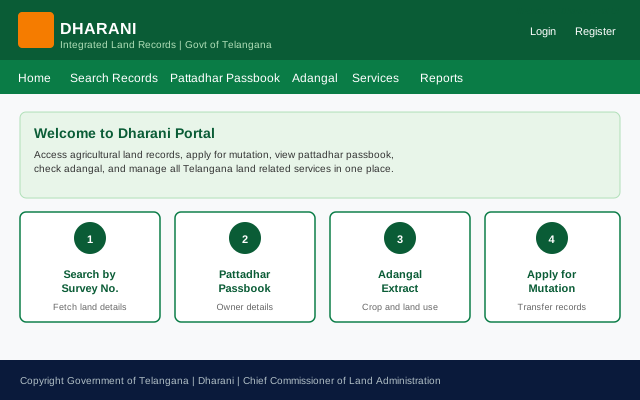
The service tiles on the homepage are the fastest way to navigate to specific tasks. Once you know what you need, click the relevant tile rather than digging through the menu bar. The header navigation is useful for related services like historical records and legacy revenue reports.
Search Land by Survey Number
The Search by Survey Number service is where most land verification tasks begin. To find any parcel in Telangana, you need four pieces of information: district, mandal, village, and survey number. The portal uses cascading dropdowns; selecting the district filters the mandal options, selecting the mandal filters the village options, and so on.
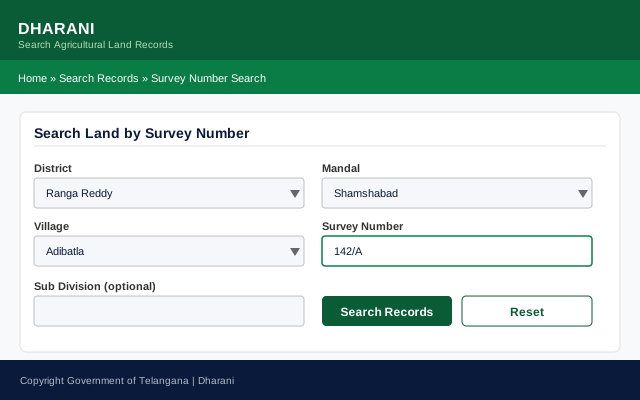
If you have only a partial survey number, the portal accepts fuzzy matches for some fields. Sub division is optional; leave it blank for a first search and refine if multiple results come back. Once the search is submitted, results appear either as the pattadhar passbook detail directly, or as a summary card if multiple sub divisions exist under the same survey number.
View the Pattadhar Passbook
The pattadhar passbook is the core ownership record for agricultural land. It shows the registered owner name, father or husband name, Aadhaar (masked), the location details, the total extent held, land classification (wet, dry, garden), and history of any recent changes. For land verification before purchase or as part of inheritance work, the pattadhar passbook is the primary reference document.
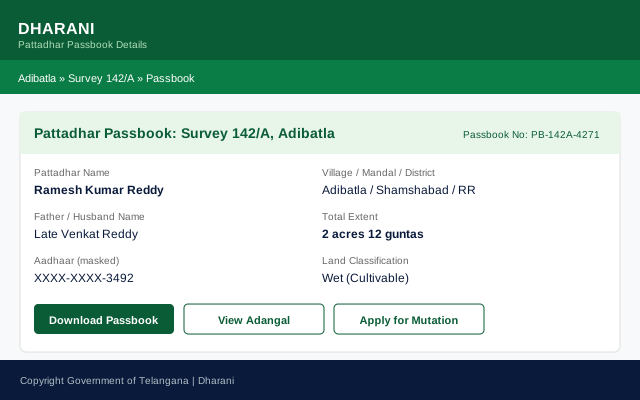
The Download Passbook button generates an official PDF extract that can be used for verification, banking, and legal purposes. This is the closest thing to a digital title document for agricultural land in Telangana. The passbook number is unique and stays with the land holding regardless of ownership changes.
Note the masked Aadhaar display. The portal shows only the last four digits publicly for privacy. Full details are available only to the pattadhar themselves after Aadhaar authentication.
Check the Adangal Extract
The adangal, also called pahani, is the annual cultivation record for the land. It shows what was cultivated in the Kharif and Rabi seasons of the current agricultural year, the extent under cultivation, the crop type, irrigation source, and yield. For long term buyers, the adangal history is a useful indicator of whether the land has been actively cultivated or fallow.
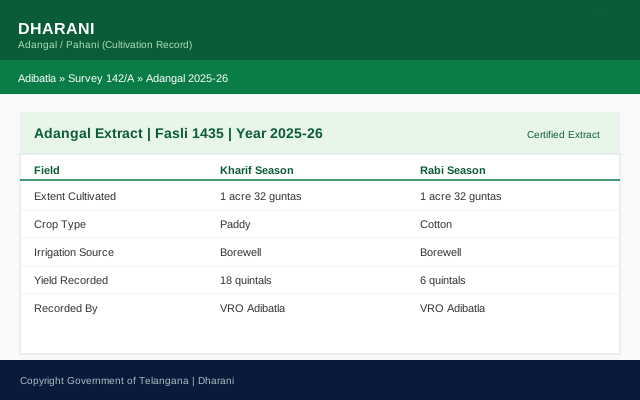
The current year adangal is available from the pattadhar passbook screen via the View Adangal button. Historical adangal records for prior years are accessible through a separate menu path under Reports. Historical adangal records from 1954 onwards are digitised in most cases and can be used as evidence of long term possession for boundary disputes or inheritance claims.
Apply for Mutation
Mutation is the process of updating the pattadhar passbook to reflect a new owner after sale, inheritance, or gift. The Dharani portal has streamlined this considerably compared to the pre 2020 process. From the pattadhar passbook screen, click Apply for Mutation to start the workflow. The application takes you through five steps: property details, applicant details, supporting documents, fees, and final review.
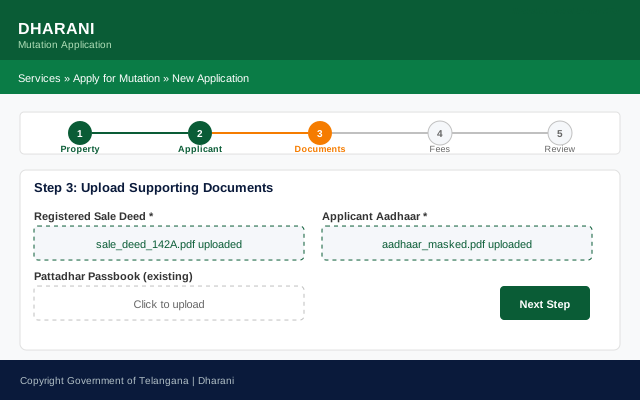
The documents required for mutation vary by type of transfer. For a sale based mutation, the registered sale deed and buyer Aadhaar are the main documents. For inheritance mutation, a legal heir certificate or succession certificate is required. For gift based mutation, the registered gift deed is the primary document. All documents should be uploaded as clear PDF scans; the portal accepts files up to a specified size limit per document.
After submission the application receives a unique reference number that can be used to track progress. Mutation fees are payable online through the portal at the fees step, before final submission.
Track Application Status
Once a mutation or other application is submitted, its progress can be tracked through the Application Tracking service. The tracking screen shows the current status, the completed steps, the current pending step, and the expected timeline for completion. Applications typically move through: submission, VRO verification, tahsildar review, and passbook update.
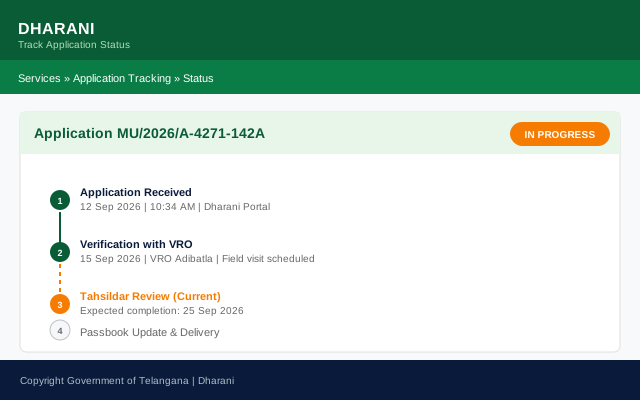
Typical timelines are 15 to 30 days for a straightforward mutation and 45 to 60 days for cases requiring field verification or clarification. The tracking screen shows the estimated completion date and any queries raised. Applicants who do not respond to queries within the specified window face automatic rejection, which is a common cause of failed applications.
Common Dharani Portal Issues and How to Resolve Them
Wrong survey number. A survey number that returns no results may be misspelled, in the wrong format, or the underlying record may not have been digitised. Try alternate formats first. If that fails, contact the tahsildar office in the mandal for the actual current survey number, which sometimes differs from what appears on older deeds.
Name mismatch between deed and record. The pattadhar passbook shows the name as recorded in the government system, which may differ from the name on your sale deed if the record was not updated after purchase. This is exactly the mutation process; apply for mutation with the sale deed to update the record.
Land classification error. Occasionally the land classification (wet, dry, garden) is incorrectly recorded, affecting valuation and use. Reclassification requires a physical inspection by VRO and formal application through the tahsildar office; the Dharani portal has an option to initiate this.
Aadhaar linking issues. Full portal access requires the pattadhar Aadhaar to be linked to their record. If linking fails, verify that the name in the record matches the Aadhaar name; small mismatches can block the linking process. VRO office can assist with correction.
What ProbityPM Can Do with Dharani
Probity handles Dharani portal work for property owners and buyers across Telangana. We verify land records against sale deeds, pull pattadhar passbook and historical adangal extracts, apply for mutation on behalf of clients with proper documentation, track applications through resolution, and handle related revenue office work. For NRI buyers and inheritors, the Dharani portal work can be complex from abroad; Probity manages the entire process locally with regular updates.
Get Expert Help from Probity
Probity manages 200 plus properties across 135 plus locations in Greater Hyderabad. Our team handles everything from physical verification to legal compliance, so NRI and absentee owners can manage their Hyderabad assets with complete peace of mind.
Frequently Asked Questions
Dharani is the integrated land records portal for Telangana, launched in 2020 to consolidate revenue records, mutations, and land services onto a single digital interface. Users can search land records by survey number, view pattadhar passbook, check adangal cultivation records, apply for mutation, and track applications. It is the primary online interface for agricultural and open land in Telangana.
From the Dharani portal homepage, use the Search by Survey Number service. Select the district, mandal, and village from cascading dropdowns, then enter the survey number in the format as it appears on your sale deed. Submit the search to view the pattadhar passbook details for the parcel. If the search returns no results, try alternate formats for the survey number or contact the local tahsildar office.
The pattadhar passbook is the core ownership record for agricultural land in Telangana, showing the registered owner name, location details, extent held, land classification, and change history. On the Dharani portal, navigate to the passbook screen from the search results and click Download Passbook to generate an official PDF extract usable for verification, banking, and legal purposes.
From the pattadhar passbook screen, click Apply for Mutation to start the five step workflow: property details, applicant details, supporting documents (sale deed for sale mutation, legal heir certificate for inheritance, gift deed for gifts), fees payment, and final review. On submission, you receive a unique application reference number for tracking through resolution.
Typical timelines are 15 to 30 days for a straightforward mutation and 45 to 60 days for cases requiring additional verification or clarification. Applications progress through: submission, VRO verification (field visit), tahsildar review, and final passbook update. Applicants can track progress through the Application Tracking service on the portal.
Probity verifies land records against sale deeds, pulls pattadhar passbook and historical adangal extracts, applies for mutation on behalf of clients with proper documentation, tracks applications through resolution, and handles related revenue office work. For NRI buyers and inheritors, Probity manages the entire process locally with regular updates so the client does not need to interact with the portal from abroad.